Small business owners wear many hats. In a single day you might sell, answer support emails, send invoices, and plan next month’s marketing. In that environment, customer information tends to end up everywhere and nowhere at once. A good customer relationship management system pulls it into one place, but choosing one can feel overwhelming. Hundreds of products promise to “supercharge your sales,” and most of their websites look suspiciously alike.
This buyer’s guide cuts through the noise. Instead of naming a single “winner,” which rarely helps because every business is different, it shows you how to evaluate options, what features actually matter at small-business scale, which warning signs to watch for, and how to run a trial that reveals the truth about a product before you commit.
Why Small Businesses Need a Different Kind of CRM
Enterprise CRMs are designed for companies with dedicated administrators, long implementation projects, and complex approval chains. Small businesses have the opposite constraints: limited time, limited budget, and nobody whose full-time job is to maintain software. A CRM that takes three months to configure is a poor fit when you need results this quarter.
For a small business, the ideal CRM is fast to set up, intuitive enough that new hires can use it after a short walkthrough, affordable at your current size, and flexible enough to grow. It should reduce work, not create more of it.
Start With Your Problem, Not the Product
Before you open a single vendor website, write down the specific problems you want to solve. Vague goals such as “get organized” lead to vague purchases. Concrete goals lead to better decisions. Common examples include:
- Leads are lost because no one follows up quickly.
- Customer history lives in one person’s inbox.
- You cannot tell how much revenue is likely to close this month.
- Quotes and proposals are created manually every time.
- Marketing emails go to everyone because the list is not segmented.
Rank your top three. These become the criteria against which every product is judged. If a feature does not help solve one of them, it should not influence your decision, no matter how impressive the demo looks.
The Features That Matter Most for Small Teams
Simple Contact Management
You should be able to add a contact in seconds, import an existing spreadsheet without a headache, and search quickly. Look for custom fields, tags, and the ability to link people to companies. If importing your current data is painful, expect adoption problems later.
A Visual Sales Pipeline
A drag-and-drop pipeline is the feature most small business owners fall in love with first, because it answers the question “where do my deals stand?” at a glance. Make sure you can rename stages to match your real process rather than forcing your sales cycle into someone else’s template.
Email and Calendar Integration
If your CRM does not connect to your email and calendar, you will be doing double data entry, and you will quit. Two-way sync with the platforms your team already uses, such as Google Workspace or Microsoft 365, is close to non-negotiable.
Automation You Can Actually Use
Small teams benefit enormously from basic automation: assigning new leads, sending a follow-up email after a form submission, creating reminder tasks when a deal sits idle. The key word is basic. You want an automation builder you can configure in an afternoon, not one that requires a consultant.
Mobile App
Many small business owners work on the move, visiting clients, attending events, or working from job sites. A reliable mobile app lets you log a conversation in the parking lot while the details are still fresh. Test it during your trial, because quality varies widely.
Reporting That Answers Real Questions
You do not need fifty dashboards. You need clear answers to a handful of questions: how many new leads came in, which sources produce customers, how many deals are open, and what is your win rate. Check that these reports are available without custom development.
Integrations With Your Existing Tools
Your CRM should work with your accounting software, website forms, scheduling tool, payment processor, and email marketing platform. If a direct integration does not exist, look for support through connectors such as Zapier or Make, and confirm any extra cost.
Features You Can Probably Skip (For Now)
Sales demos often showcase advanced capabilities that sound exciting but rarely matter for a team of five. Be skeptical of paying extra for:
- Complex territory management and quota modeling
- Elaborate approval workflows
- Advanced predictive analytics that need large data sets to be useful
- Heavy customization that requires developers
These features may become valuable as you grow, which is why scalability matters, but you should not pay for them before you need them.
Understanding CRM Pricing Models
Pricing structures can be confusing, and the headline price is rarely the whole story. Most vendors use one or more of these models:
Per-user, per-month pricing. The most common model. Costs scale as you add team members, and higher tiers unlock automation, reporting, and customization. Check whether the advertised price assumes annual billing.
Freemium plans. Some providers offer a free tier with limited contacts or features. Free plans are excellent for testing and for very small operations, but understand the limits and what an upgrade will cost.
Tiered feature bundles. Features you consider essential may sit on a higher plan than the one advertised. Read the comparison chart carefully.
Add-ons and usage fees. Email sending volume, extra storage, additional contacts, and premium support can all raise the final bill.
Because plans and prices change often, always verify current details on the vendor’s own pricing page and ask about annual discounts, onboarding fees, and contract terms before you sign.
Build a Simple Scoring System
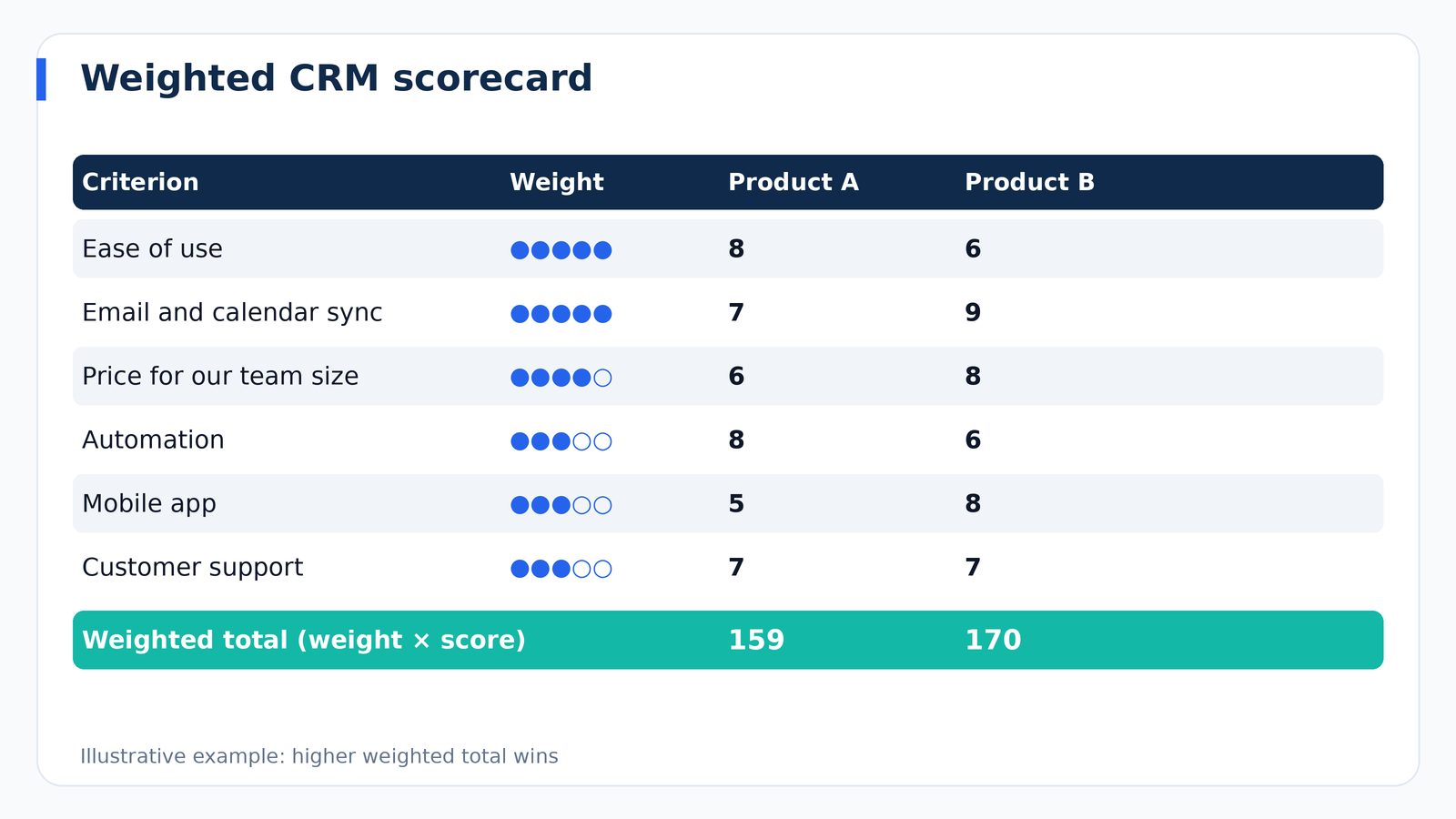
When two or three products look similar, a scorecard replaces gut feeling with evidence. Here is a straightforward method that takes less than an hour.
- List your criteria. Use your top problems plus factors such as ease of use, price, integrations, mobile experience, and support quality.
- Assign weights. Give each criterion a weight from 1 to 5 based on its importance to your business.
- Score each product. After a hands-on trial, rate each criterion from 1 to 10.
- Multiply and total. Multiply each score by its weight and add up the results.
- Sanity-check the winner. If the highest score surprises you, ask why. Sometimes the process reveals a hidden priority.
Involve the people who will use the system daily. A tool the owner loves but the team hates will fail.
How to Run a Meaningful Free Trial
Most people waste trials by clicking around the demo data. A better approach is to treat the trial as a rehearsal of your real work.
- Import real contacts. Use a sample of 50 to 100 actual records so you experience the true import process.
- Recreate your pipeline. Build your actual stages and add several live deals.
- Connect your email and calendar. Confirm that messages and meetings sync as promised.
- Build one automation. For example, a follow-up task after a form submission. Note how long it takes.
- Use the mobile app. Log a call and add a note from your phone.
- Contact support. Ask a real question and see how quickly and helpfully they respond.
- Ask your team. Have at least one other person try it and share honest feedback.
Red Flags to Watch For
Certain warning signs appear repeatedly in disappointing CRM purchases:
- Pressure to sign immediately. A good product can survive a thoughtful evaluation.
- Vague answers about pricing. If you cannot get a clear total cost, assume surprises are coming.
- Difficult data export. You should always be able to take your data with you. Ask how export works before you commit.
- Long-term contracts for a first purchase. Monthly or annual terms with the option to cancel reduce your risk.
- Poor reviews about support. Slow or unhelpful support becomes a serious problem when something breaks during a busy week.
- Clunky interface. If basic tasks feel confusing during the trial, they will not get easier later.
Matching the CRM to Your Business Type
Different businesses emphasize different capabilities, so it helps to think about what your model demands.
Service businesses and consultants usually value appointment scheduling, proposals, and follow-up automation. Contact history and notes are central because relationships often drive repeat business.
Retail and ecommerce businesses benefit from purchase history, segmentation, and integration with their store platform and email marketing so they can run targeted campaigns and win-back offers.
Agencies and B2B companies need strong pipeline management, multiple contacts per account, and reporting on lead sources, since their sales cycles are longer and involve several decision makers.
Real estate, insurance, and financial services often need long-term nurturing, document handling, and compliance features, and may prefer industry-specific tools built around their workflows.
Home services and trades usually want mobile-first tools with quoting, scheduling, and quick lead response, because speed to respond often decides who gets the job.
Plan the Rollout Before You Buy
Many small businesses do the hard work of choosing a tool and then stumble on adoption. A simple rollout plan prevents that.
Choose an owner. One person should be responsible for configuration, training, and data quality, even if the role is part-time.
Clean your data first. Remove duplicates, fix obvious errors, and standardize formats in your spreadsheet before importing. Importing messy data into a new system just gives you a messy new system.
Start with essentials. Launch with contacts, a pipeline, and email sync. Add automation and reporting after the team is comfortable.
Set clear expectations. Decide that if it is not in the CRM, it did not happen. Consistency is what makes the data trustworthy.
Review after 30 and 90 days. Ask what is working, what is annoying, and what should change. Small adjustments early save frustration later.
Common Questions From Small Business Owners
Is a free CRM good enough?
For very small operations or early testing, a free plan can be a smart starting point. Pay attention to contact limits, automation restrictions, and the cost of upgrading, so growth does not catch you off guard.
Should I choose an all-in-one platform or a specialized tool?
All-in-one platforms combine CRM, email marketing, and sometimes support or invoicing, which simplifies your stack. Specialized tools may offer deeper features in one area. If your team is small and time is scarce, an all-in-one system is usually the more practical choice.
How many people should be involved in the decision?
Include everyone who will use the system regularly, along with whoever manages the budget. Broad input at the start improves adoption at the end.
What if I outgrow my CRM?
It happens, and it is manageable if you choose a system with good export options and keep your data clean. Migration is far easier when your records are well organized.
Final Thoughts
The best CRM for a small business is not the one with the longest feature list or the loudest advertising. It is the one that solves your biggest problems, fits your budget, and gets used every day by your team. Define your priorities, build a weighted scorecard, test with real data, and watch for red flags. Take the time to plan your rollout and keep your data clean, and your CRM will quietly become one of the most valuable assets in your business.