Real estate is a relationship business. A single transaction can take months, involve emotional decisions, and be followed by years of referrals from a satisfied client. Yet most agents lose far more opportunities to disorganization than to competition. A lead from an open house never gets a call back. A past client’s home anniversary passes without a note. A buyer who was “not ready for six months” is forgotten when they are finally ready.
A customer relationship management system fixes this. For agents and teams, a CRM is the single place where every lead, client, property interest, conversation, and task is tracked, and where follow-up becomes systematic instead of dependent on memory. This guide explains why a CRM matters in real estate, which features to look for, how to build workflows for buyers, sellers, and past clients, and how to use the system to create a business that grows through repeat clients and referrals.
Why Real Estate Agents Need a CRM
The typical agent juggles prospects at every stage: people just browsing online, buyers touring homes, sellers preparing to list, clients in escrow, and past clients who could refer friends. Each needs different communication at different times. Without a system, the loudest or most recent contact gets attention, while quieter opportunities fade.
The economics reward follow-up. Many real estate leads take a long time to mature, and the agent who stays helpfully in touch is usually the one called when the person is ready. A CRM makes that sustained contact practical. It also supports a few other realities of the business:
- Speed to lead matters. Online inquiries often go to whoever responds first, so instant notifications and quick replies make a difference.
- Your database is an asset. Your network of past clients, sphere of influence, and long-term leads is a valuable, portable business asset when organized well.
- Compliance and records matter. Documenting communications and consent supports professional standards.
- Teams need coordination. Lead routing, assignments, and shared visibility prevent dropped balls and conflicts.
Core CRM Features for Real Estate
Lead Capture From Multiple Sources
Leads arrive from your website, listing portals, social media, paid ads, open house sign-in sheets, referrals, and phone calls. A good real estate CRM gathers them in one place and tags the source so you know which channels pay off. Look for integrations with your website’s IDX search or lead forms, ad platforms, and portal lead feeds.
Contact Segmentation
Use tags and fields to separate buyers, sellers, investors, renters, past clients, and sphere contacts. Track details such as price range, preferred neighborhoods, property type, timeline, pre-approval status, and listing address. The richer the profile, the more relevant your outreach.
Transaction and Pipeline Management
Separate pipelines for buyers and sellers let you see where each deal stands, from first conversation to closing. Typical buyer stages include new lead, consultation, searching, offer, under contract, and closed. Seller stages might include listing appointment, listing signed, active, under contract, and closed. Task lists for each stage help ensure nothing is missed, such as inspections, appraisals, and deadlines.
Automated Follow-Up
Automation is the real estate agent’s secret weapon. Instant text or email responses to new inquiries, drip campaigns for long-term leads, and reminders for personal follow-ups let you maintain regular contact with hundreds of people without it consuming your day.
Email and Text Messaging
Real estate communication often happens by text. Choose a CRM that supports two-way texting with proper consent and opt-out handling, along with email templates and campaigns. Logging these conversations in the contact record keeps a full history.
Calendar and Task Management
Showings, listing appointments, open houses, and deadlines belong in one calendar, synced with your phone. Task reminders ensure that follow-up calls and document deadlines are never forgotten.
Mobile Access
Agents spend much of their day in cars and at properties. A strong mobile app lets you look up a client’s details before a showing, log notes immediately afterward, and respond to new leads from anywhere.
Document and E-Signature Integration
Many agents connect their CRM to document tools and e-signature platforms, keeping contracts and disclosures linked to the client record. Check which transaction management systems your brokerage uses and whether the CRM integrates.
Building Workflows for Each Client Type
New Online Leads
Speed and personalization matter most. When a lead arrives, the CRM should immediately notify you, send an automated but friendly reply, and create a task to call within minutes. If you cannot reach them, a short sequence of follow-up texts and emails over the next several days keeps the door open. Mention the property or neighborhood they inquired about so the message feels relevant rather than generic. Use the first conversation to learn their timeline, motivation, and whether they are working with another agent.
Active Buyers
Set up saved searches or regular listing updates matched to their criteria. Schedule check-in calls after showings, log their feedback on each home, and note changes in preferences. This history turns you from a door-opener into an advisor who truly understands what they want. Create reminders for key dates such as pre-approval expiration or lease end.
Long-Term Nurture Leads
Many people are months or years from a move. Place them in a low-pressure nurture track with valuable content: local market updates, neighborhood spotlights, financing basics, and seasonal tips for homeowners. Schedule occasional personal touches, and flag leads who show renewed interest, such as clicking on listings or replying to a message, for direct outreach.
Sellers
For prospective sellers, the CRM can track home details, estimated timelines, and past conversations about pricing and preparation. Use automated reminders to follow up after listing appointments, and send periodic market reports so owners see value in your expertise. Once listed, track marketing activities, showing feedback, and offer communication in one place so you can keep the seller informed with confidence.
Under-Contract Clients
Transaction stages create many deadlines. Build task templates for inspection, appraisal, financing contingencies, and closing preparation. Automated reminders protect you and your client from missed dates, and regular status updates reduce anxiety during a stressful process.
Past Clients and Sphere of Influence
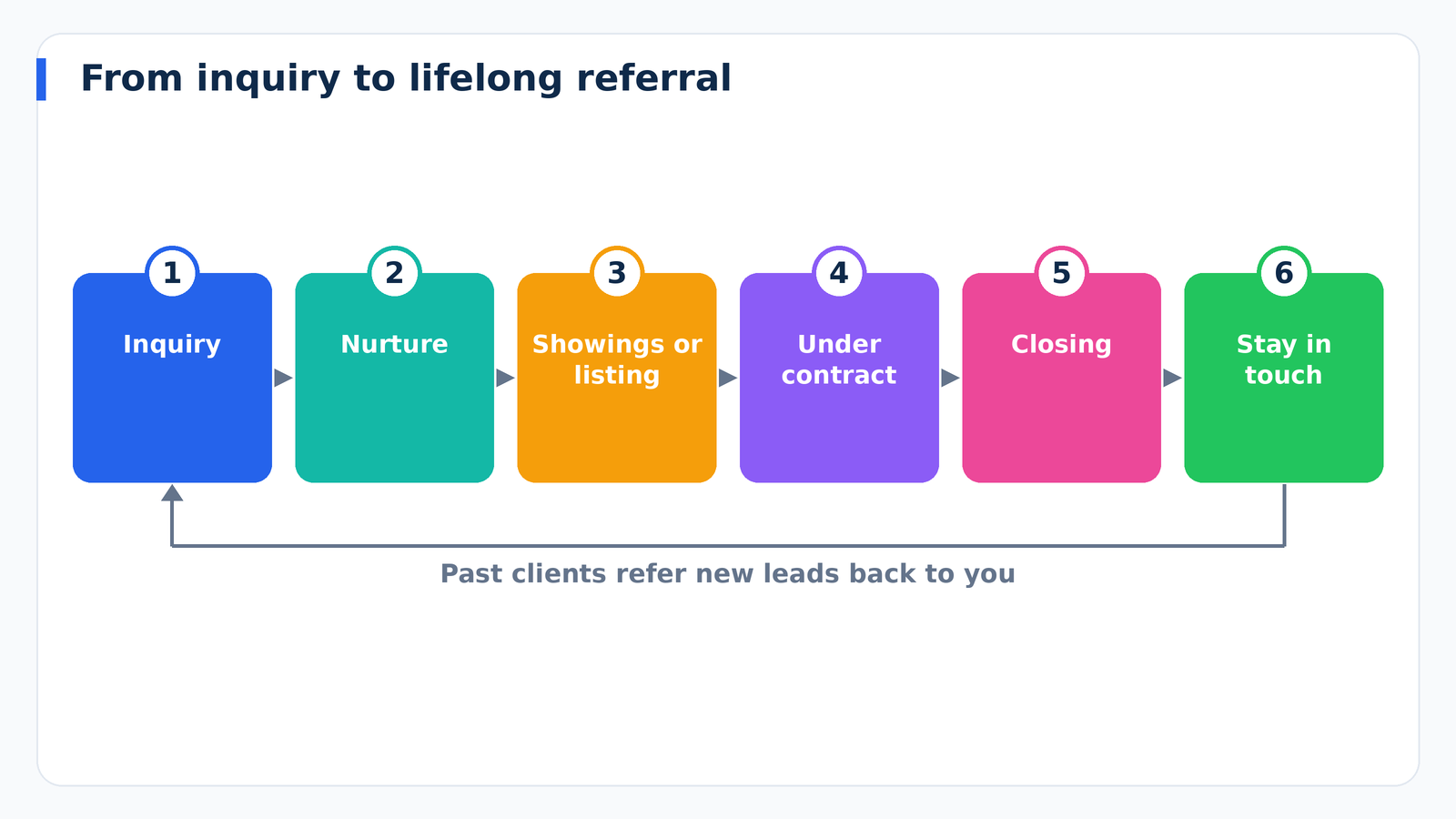
This segment is often the most profitable and most neglected. Satisfied clients refer friends and return when they buy or sell again, but only if you stay top of mind. Use your CRM to schedule:
- A thank-you note and check-in shortly after closing.
- A home anniversary message each year.
- Birthday and holiday greetings.
- Annual home value updates and equity reviews.
- Invitations to client appreciation events.
- A gentle referral request at appropriate moments.
Lead Sources and Tracking Return on Investment
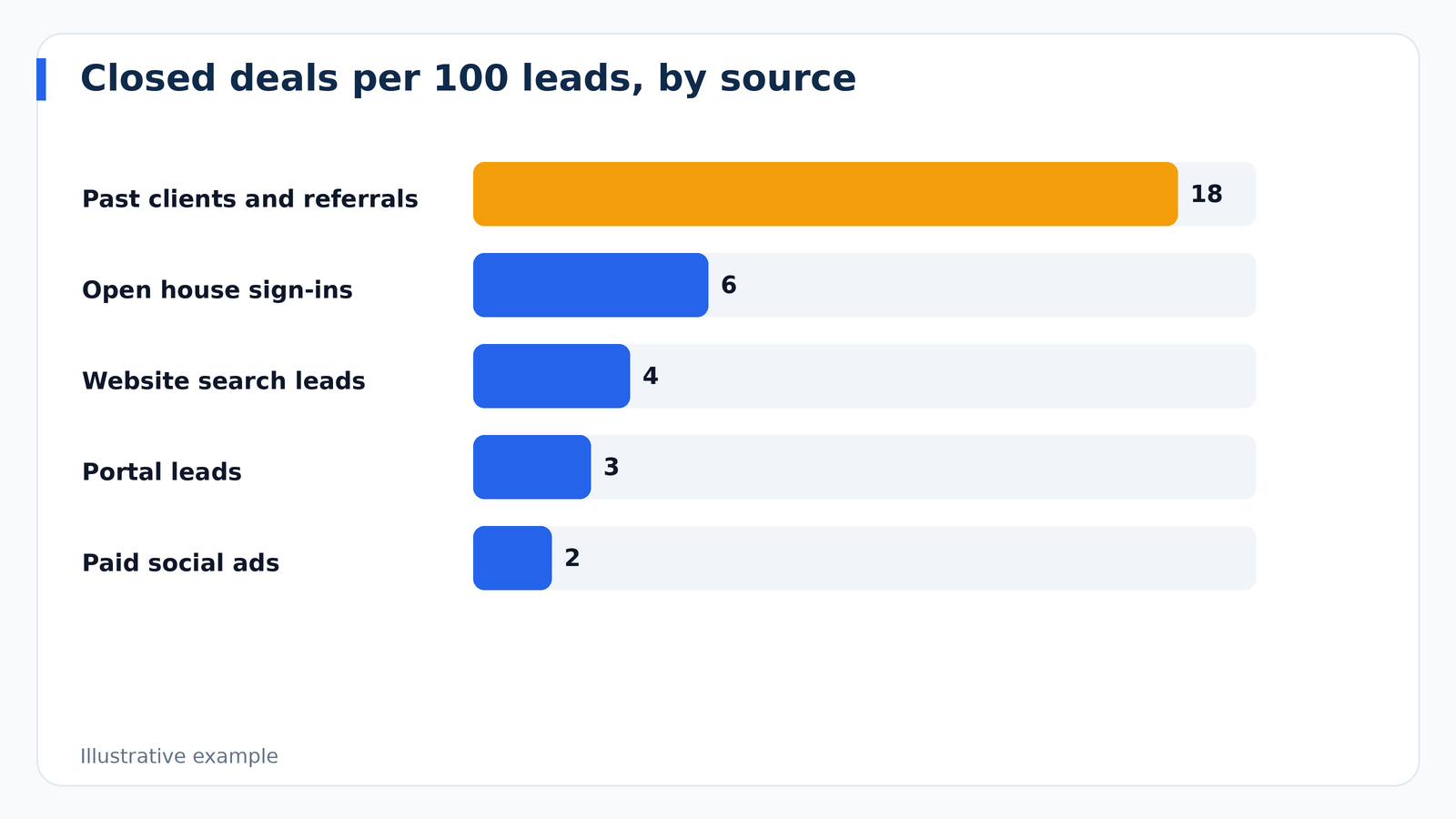
Real estate marketing involves real money, from portal leads and ads to signs and events. Your CRM tells you which sources produce closed transactions rather than just inquiries. Track the full chain: leads generated, appointments set, contracts signed, and commissions earned per source. You may discover that referrals and past clients deliver the highest conversion at the lowest cost, or that a particular ad campaign produces many leads but few clients. Use this evidence to shift your budget toward what works.
The 80 Percent Rule: Staying in Touch Consistently
Many successful agents follow a simple principle: consistent, valuable contact beats occasional big pushes. Build a communication calendar that mixes channels. For instance, a monthly email newsletter, a quarterly personal call to top contacts, handwritten notes at key moments, and timely texts about relevant market changes. Your CRM can create recurring tasks so these touches happen automatically, and tags can prioritize your top relationships for more personal attention.
Real Estate CRM Tips for Teams and Brokerages
When multiple agents work together, additional considerations arise. Define a lead routing method, such as round-robin, by geography, or by price range, so inquiries reach the right person quickly. Set clear ownership rules to avoid disputes about who holds a relationship. Use permissions so agents see their own data while managers see team performance. Dashboards showing response times, appointments, and conversion help leaders coach effectively. If someone leaves the team, a well-maintained CRM ensures client relationships can be transitioned smoothly, according to your brokerage’s policies.
Compliance and Best Practices
Real estate professionals handle sensitive personal and financial information, so treat CRM security seriously. Use strong passwords and multi-factor authentication, limit access by role, and avoid storing unnecessary sensitive data. Follow rules for commercial email and text messaging in the United States, including consent for marketing texts and honoring opt-outs, and be mindful of the Fair Housing Act in your communications and segmentation choices. Rules vary by state and brokerage, so consult your broker or a qualified attorney with questions.
How to Choose a Real Estate CRM
- Decide between general and industry-specific tools. Real estate-specific platforms include features like IDX integration, transaction tracking, and prebuilt campaigns. General CRMs offer flexibility and often lower cost but need more setup.
- Check lead source integrations. Make sure your key lead channels connect automatically.
- Test the mobile app. Use it at a showing or open house during your trial.
- Evaluate texting and email tools. Confirm consent handling and message history.
- Look at automation options. Ensure you can build drip campaigns and task templates simply.
- Verify data portability. Your contact database is an asset, so confirm you can export it.
- Consider support and training. Onboarding help is valuable, especially if you are new to CRMs.
- Understand the total cost. Add up subscription fees, text messaging charges, and add-ons.
Getting Started: A 30-Day Plan
Week 1: Gather and clean contacts. Pull together your phone contacts, email, past client lists, and spreadsheets. Remove duplicates and add basic tags such as buyer, seller, and past client.
Week 2: Set up and connect. Configure pipelines, connect lead sources, sync your email and calendar, and install the mobile app.
Week 3: Build core automations. Create an instant response for new leads, a long-term nurture sequence, and a past client touch schedule.
Week 4: Establish habits. Spend time in the CRM each day, log every conversation, and review your pipeline weekly. Refine messages and workflows based on early results.
Common Mistakes Real Estate Agents Make With CRMs
- Collecting contacts but not following up. A database only helps if you use it.
- Using automation as a replacement for relationships. Automated messages should support, not replace, personal contact.
- Ignoring past clients. The easiest transactions often come from people who already trust you.
- Inconsistent data entry. Missing notes and stale statuses weaken your system.
- Overbuying features. Start with essentials and add as your business grows.
- Neglecting data backup and security. Protect the asset you have worked hard to build.
Frequently Asked Questions
How much time should an agent spend in their CRM each day?
Many agents spend a short block at the start and end of each day reviewing tasks and logging activity. With mobile access and automatic logging, the system should save more time than it consumes.
Can a new agent with a small database benefit?
Yes. Building good habits early is easier than fixing disorganization later, and a CRM helps new agents make the most of every contact.
Is it better to use my brokerage’s CRM or my own?
Brokerage tools can be convenient but may limit ownership and data export. Consider whether you can take your contacts with you if you change brokerages, and check your agreement.
How often should I contact leads and clients?
It depends on their stage. Active buyers and sellers need frequent communication, while long-term contacts do well with a mix of monthly valuable content and occasional personal touches.
Final Thoughts
For real estate agents, a CRM is more than a contact list. It is a system for responding fast, nurturing relationships for the long haul, and turning satisfied clients into a steady stream of referrals. Choose a tool that fits how you work, clean and organize your database, automate the routine, and keep your personal touch where it counts. Agents who treat their database as the foundation of their business are the ones who build resilient careers through every market cycle.