Artificial intelligence has moved from conference keynotes into the daily workflow of sales, marketing, and customer service teams. Almost every major CRM now advertises AI features: assistants that draft emails, tools that summarize calls, models that score leads, and chatbots that answer customer questions around the clock. Some of these capabilities are genuinely useful. Others are marketing gloss on ordinary automation.
This guide explains how AI is used in CRM systems, where it delivers real value, where it falls short, and how to adopt it responsibly. The goal is not to hype the technology but to help you separate practical applications from empty promises, so you can make smart decisions about tools, data, and people.
What Does “AI in CRM” Actually Mean?
The phrase covers several different technologies, and it helps to distinguish them.
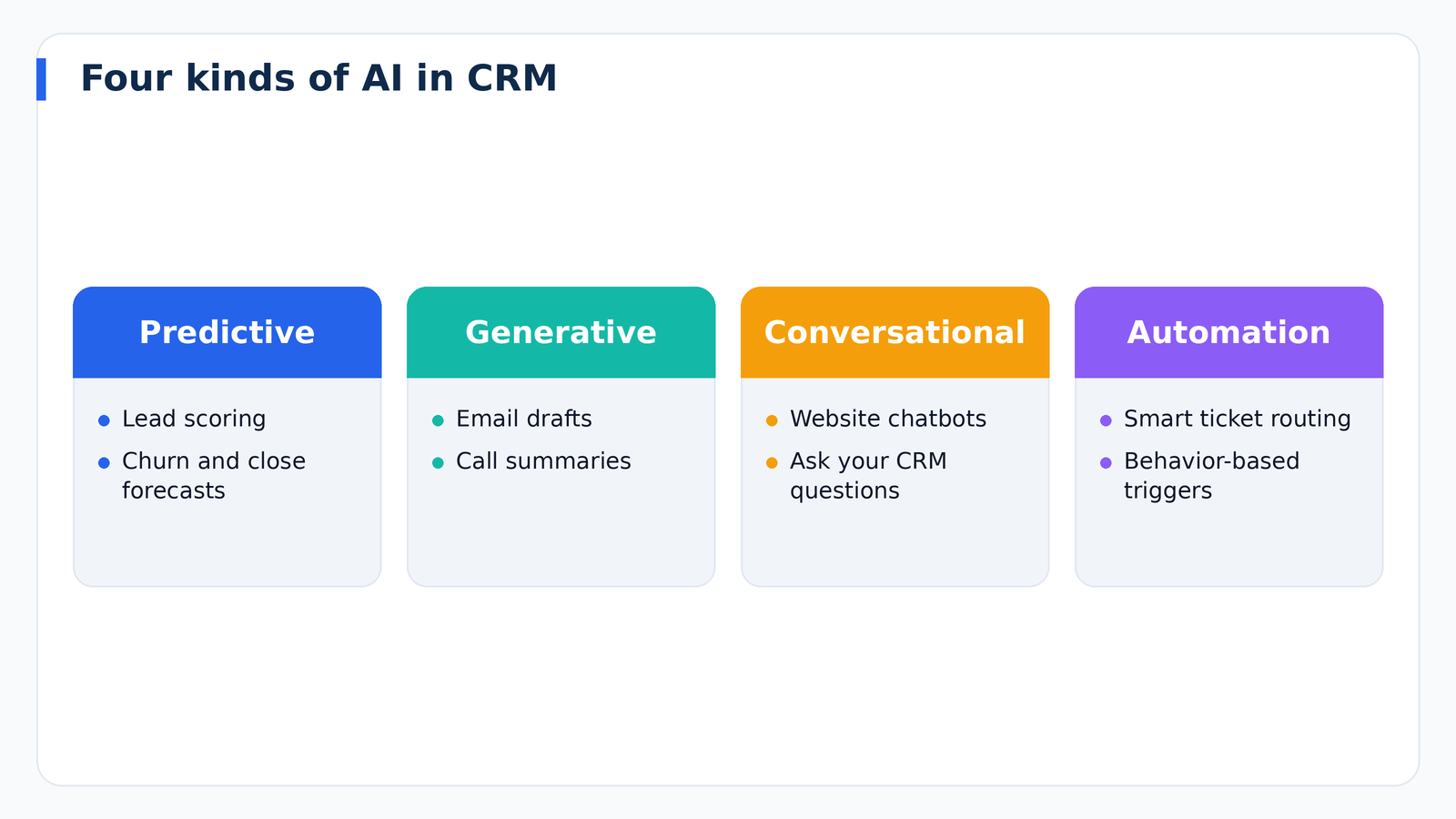
Predictive AI uses historical data to forecast outcomes. Examples include scoring which leads are most likely to convert, predicting which customers may churn, and estimating the likelihood that a deal will close. These models have been part of CRM for years and rely on patterns found in structured data.
Generative AI creates new content. In a CRM, this includes drafting emails, writing call follow-ups, producing meeting summaries, generating proposals, and suggesting responses to customer questions. It has become the most visible form of AI because it works in natural language and is easy to try.
Conversational AI powers chatbots and virtual assistants that interact with customers or employees. Customers can ask questions on your website, while employees can ask the CRM questions such as “which deals are at risk this month?” and receive answers drawn from their data.
Automation with AI-driven decisions combines workflows with intelligent triggers, such as routing a support ticket to the best agent based on its content or prioritizing leads based on behavior.
Practical Uses of AI in Sales
Lead Scoring and Prioritization
Traditional lead scoring relies on rules you define. AI-based scoring analyzes past wins and losses to identify patterns that humans might miss, such as combinations of company traits and behaviors that predict a purchase. The result is a ranked list that helps reps focus on the leads most likely to convert. These models need enough historical data to be reliable, and they should be checked against real outcomes.
Email and Message Drafting
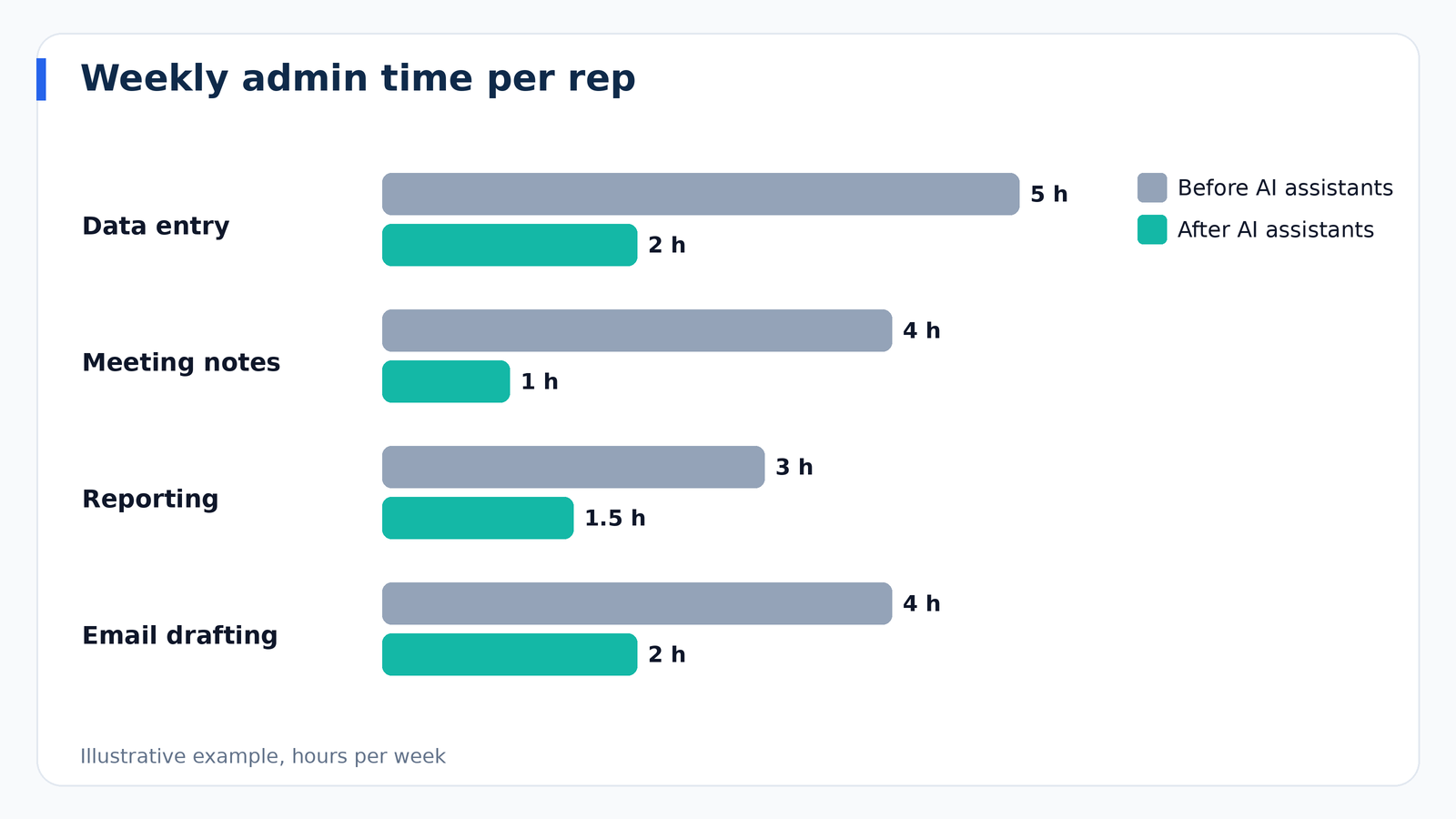
Generative tools can create a first draft of a prospecting email, a follow-up after a meeting, or a reply to an objection, using details stored in the CRM. This saves time, particularly on routine messages. The best practice is to treat the output as a draft: review for accuracy, tone, and authenticity before sending, and add the specific personal detail that only you know.
Call and Meeting Summaries
Many platforms can transcribe conversations, summarize key points, extract action items, and log them in the record automatically. This reduces administrative work and improves data completeness. Always follow recording consent laws, which vary by state and country, and tell participants when a call is being recorded or transcribed.
Forecasting and Deal Insights
AI can analyze pipeline data, activity levels, and past performance to estimate which deals are likely to close and flag those at risk. It can highlight signals such as no recent contact, missing decision makers, or slowing engagement. These insights supplement human judgment, and forecasting accuracy still depends heavily on the quality of the data entered.
Next-Best-Action Recommendations
Some systems suggest what to do next: call this contact, send a case study, loop in a manager. When well designed, these prompts help newer reps behave more like experienced ones, but they work best when reps understand the reasoning and can override them.
Practical Uses of AI in Marketing
Audience Segmentation
AI can cluster customers based on behavior and attributes, uncovering segments you may not have defined manually. This can improve targeting and reveal unexpected opportunities.
Content Creation and Optimization
Generative tools help write subject line variations, ad copy, landing page text, and social posts. They accelerate brainstorming and first drafts. Human oversight remains essential for brand voice, factual accuracy, and compliance, particularly for regulated industries.
Send-Time and Channel Optimization
Some platforms analyze engagement history to choose the best time or channel for each contact. Gains vary, but the approach can reduce manual testing.
Personalization at Scale
By combining customer data with generative text, marketers can tailor messages to different segments or even individuals. The key is accurate data. Personalization built on wrong information damages trust faster than a generic message would.
Practical Uses of AI in Customer Service
Chatbots and Virtual Agents
Modern chatbots can answer common questions, collect information, and hand off to human agents when needed. They provide immediate responses at any hour and reduce the load on support teams. Success depends on providing accurate, up-to-date knowledge and designing a clear path to a human, because customers become frustrated when trapped in a loop.
Ticket Routing and Prioritization
AI can read incoming requests, categorize them, detect urgency or sentiment, and route them to the right team. This shortens response times and ensures critical issues are noticed.
Agent Assistance
Assistants can suggest answers from a knowledge base, summarize a long ticket history, and draft replies for agents to review. This reduces handling time and helps new agents get up to speed.
Sentiment Analysis and Churn Signals
By analyzing language and behavior, AI can flag unhappy customers or accounts showing signs of disengagement, giving teams a chance to intervene before they leave.
What AI Cannot Do (Yet)
Responsible adoption begins with realistic expectations.
- It cannot fix bad data. AI amplifies the quality of your data, good or bad. Duplicates, missing fields, and outdated records produce unreliable outputs.
- It can make confident mistakes. Generative models sometimes produce plausible but incorrect statements, a problem often called hallucination. Anything customer-facing should be reviewed or constrained to approved information.
- It does not understand your business automatically. Results improve when you supply context, guidelines, and examples.
- It cannot replace relationships. Trust, empathy, and judgment remain human strengths, especially in complex or high-stakes sales.
- It does not guarantee ROI. Benefits must be measured like any other investment.
Risks and Responsible Use
Data Privacy and Security
AI features process customer data, so understand how your vendor handles it. Ask whether your data is used to train models, where it is stored, who can access it, and what controls exist. Review privacy policies and contractual terms, and make sure your use complies with the laws that apply to you, such as state privacy laws in the United States and, where relevant, international regulations. For legal questions, consult a qualified professional.
Bias and Fairness
Models trained on historical data can reproduce historical bias. If past decisions favored certain groups, a scoring model may learn the same pattern. Review how AI-driven decisions affect different customers, especially in contexts like lending, housing, insurance, or employment, where fairness rules are strict.
Transparency
Be honest with customers when they are interacting with an automated system, and be able to explain how decisions are made. Transparency supports trust and is increasingly expected by regulators.
Over-Reliance
Teams that trust AI blindly can make poor decisions or send low-quality messages at scale. Keep humans in the loop for important judgments and customer-facing communication, and encourage people to question outputs that seem off.
Brand and Quality Control
Mass-produced generic text can make your communication sound like everyone else’s. Establish style guidelines and review processes so AI-assisted content still reflects your voice and values.
How to Start Using AI in Your CRM
- Audit your data. Clean duplicates, fill critical gaps, and standardize fields before asking AI to work with them.
- Pick one or two use cases. Start with low-risk, high-value tasks such as meeting summaries, email drafting, or lead prioritization.
- Define success. Choose measurable goals, such as hours saved per rep per week, faster response time, or improved conversion at a stage.
- Review vendor terms. Understand data usage, security, and pricing, since some AI features cost extra.
- Pilot with a small group. Gather feedback on accuracy and usefulness before rolling out widely.
- Train your team. Teach people how to write good prompts, check outputs, and recognize limitations.
- Set usage policies. Specify what information may be entered, what must be reviewed, and what is off limits.
- Measure and iterate. Compare results to baselines and adjust or discontinue what is not delivering.
Questions to Ask Vendors About AI Features
- Which AI capabilities are included in my plan, and which cost extra?
- What data does the AI use, and is my data used to train models for other customers?
- How do you protect sensitive information?
- Can I control or disable features by user, team, or data type?
- How do you reduce inaccurate outputs, and how can users verify them?
- Can I see why a lead score or recommendation was produced?
- How are customers informed when they interact with automated agents?
The Road Ahead
The direction of travel is toward AI agents that can carry out multi-step tasks, such as researching an account, drafting outreach, scheduling meetings, and updating records with limited supervision. As capabilities grow, so does the importance of governance: clear rules, audit trails, and human approval for consequential actions. Organizations with clean data, defined processes, and thoughtful policies will be best positioned to benefit, while those chasing every new feature without a strategy risk cost and confusion. Because the technology changes quickly, revisit your approach regularly and verify current vendor capabilities before making decisions.
Frequently Asked Questions
Will AI replace salespeople?
AI is more likely to change the job than eliminate it. Routine tasks like data entry and first-draft writing are being automated, while relationship-building, negotiation, and strategic thinking remain human strengths.
Do small businesses benefit from AI in CRM?
Often yes, because AI can save time that small teams do not have. Meeting summaries, email drafting, and simple prioritization are practical starting points that do not require large data sets.
Is AI in CRM expensive?
It varies. Some features are included in standard plans, while others are sold as add-ons or usage-based services. Ask for a full quote and measure the value delivered.
How accurate is AI lead scoring?
Accuracy depends on data quality and volume. Evaluate by comparing scores with real outcomes over time and adjust accordingly.
Final Thoughts
AI can make CRM faster, smarter, and less burdensome, but it works best as an assistant rather than an autopilot. Start with clean data and clear goals, choose practical use cases, protect customer privacy, and keep people responsible for judgment and relationships. By pairing the efficiency of automation with human insight, you can use AI in your CRM to serve customers better and give your team more time for the work that matters most.