Choosing a CRM is the easy part. Making it work is where most projects succeed or fail. Plenty of businesses buy excellent software, spend a few weeks setting it up, and then watch it slowly turn into a digital graveyard of outdated contacts that nobody trusts. The difference between a CRM that transforms your business and one that gets abandoned is almost always the implementation, not the product.
This step-by-step guide walks you through a proven approach to CRM implementation. It works for a five-person company or a department inside a larger organization, and it emphasizes the unglamorous work that determines success: defining goals, cleaning data, simplifying configuration, training people, and measuring adoption.
Why CRM Implementations Fail
Understanding common failure patterns helps you avoid them. Projects usually stall for a handful of reasons:
- No clear goals. Without a defined purpose, the project drifts, and success cannot be measured.
- Lack of leadership support. If managers do not use the CRM themselves, nobody else will.
- Overcomplicated configuration. Too many fields, stages, and rules make the system tiring to use.
- Bad data. Importing duplicates and errors destroys trust on day one.
- Insufficient training. People revert to old habits when they do not understand the new way.
- No owner. Systems without a responsible administrator decay quickly.
Each step below is designed to counter one or more of these problems.
Step 1: Define Your Goals and Success Metrics
Start by answering a simple question: what business outcomes do we want from this CRM? Write three to five specific goals, and attach a measurable target where possible. For example:
- Respond to every new lead within a set time window.
- Increase the percentage of leads that become opportunities.
- Produce a reliable monthly sales forecast.
- Reduce time spent on manual reporting.
- Improve customer renewal rates.
Record your current performance on each measure. These baselines let you demonstrate progress later and keep the team motivated. Goals also help you say no to feature requests that do not serve the mission.
Step 2: Assemble the Right Team
Even small implementations need clear roles. Identify these people early:
Executive sponsor. A leader who communicates why the project matters, removes obstacles, and models the behavior by using the CRM in meetings.
Project owner. The person responsible for the schedule, decisions, and coordination. In small companies this may be the owner or operations manager.
CRM administrator. The person who configures the system, manages users and permissions, and maintains data quality after launch.
Champions. A few respected users from sales, marketing, or service who test early, give feedback, and help colleagues. Peer influence often matters more than top-down mandates.
Step 3: Map Your Current Processes
Before configuring anything, document how work really happens today. Walk through the path from a new lead to a paying customer and note each step, who is responsible, what information is captured, and where things get stuck. Include post-sale processes such as onboarding, support, and renewals if the CRM will cover them.
This exercise often reveals inconsistencies. Two salespeople may use different stages or define a qualified lead differently. Resolve these differences now. A CRM works best when it reflects an agreed, consistent process, and it is much easier to standardize before software enforces the rules.
Step 4: Design a Simple Data Model
Decide what information the CRM will hold and how it will be organized. Focus on the essentials:
- Objects: contacts, companies, deals, tasks, and perhaps tickets or products.
- Fields: the specific information you capture for each object.
- Relationships: how contacts link to companies and deals.
- Stages and statuses: the steps in your pipeline and the definition of each.
- Lead sources: a standard list so reporting is accurate.
A useful guideline is to include only fields that someone will use for a decision, a report, or an action. If a field would not change anything, leave it out. Required fields should be rare, and dropdown menus are better than free text for anything you plan to report on, because free text creates inconsistent data.
Step 5: Clean and Prepare Your Data
Data preparation is the least exciting step and one of the most important. Gather contacts from spreadsheets, email accounts, accounting software, and older systems. Then:
- Remove duplicates. Merge records that represent the same person or company.
- Standardize formats. Use consistent conventions for phone numbers, states, country names, and job titles.
- Fix errors. Correct obvious typos and invalid email addresses.
- Archive the irrelevant. Do not import records that are years out of date and have no business value.
- Map fields. Match each column in your spreadsheet to a field in the CRM.
- Test with a small batch. Import a sample first and inspect it carefully before importing everything.
Remember the old principle: garbage in, garbage out. Time invested here pays off for years.
Step 6: Configure the System
Now you can set up the CRM itself. Keep your first version intentionally lean.
Pipeline stages. Build the stages you mapped earlier, with clear entry criteria. For example, a deal moves to Proposal Sent only after a written proposal has gone out.
Users and permissions. Give people the access they need and no more. Role-based permissions protect sensitive information and prevent accidental changes.
Email and calendar sync. Connect inboxes so activity logs itself. This single step removes the biggest source of resistance.
Web forms and lead capture. Connect your website forms, landing pages, and chat tools so new leads flow straight in.
Automation. Start with two or three high-impact rules, such as assigning new leads to an owner, creating a follow-up task, or sending a confirmation email. Resist the urge to automate everything at once.
Dashboards and reports. Build the handful of views that match your goals, such as pipeline by stage, new leads by source, and deals closing this month.
Step 7: Integrate Your Other Tools
Connecting the CRM to your existing systems prevents double entry and creates a more complete customer picture. Priorities often include accounting or billing software, your website, email marketing, calendar and video meeting tools, and customer support software. Use native integrations first, and add middleware connectors only where needed. Test each integration with sample data and confirm what happens when records change on either side.
Step 8: Pilot With a Small Group
Before rolling out to everyone, run a pilot with your champions for a few weeks. Ask them to use the CRM for real work and to report friction points: confusing labels, missing fields, slow screens, unclear stages. Fix problems quickly and visibly. A pilot lowers risk, produces useful feedback, and creates internal advocates who can say, “I use this every day, and it helps.”
Step 9: Train Your People
Effective training is practical and role-specific. A salesperson needs to know how to log a call, update a deal, and schedule a follow-up. A manager needs to know how to read the pipeline and run reports. Avoid marathon sessions that cover every feature. Instead:
- Run short sessions focused on daily tasks.
- Use real company data rather than generic demos.
- Create one-page quick-reference guides and short screen recordings.
- Hold office hours for questions in the first weeks.
- Explain the why: what each person gains, such as less admin and more closed deals.
Make expectations explicit. For example, all new leads must be entered the same day, and pipeline reviews will be run from the CRM, not from spreadsheets. When leaders hold meetings in the CRM, adoption follows.
Step 10: Launch and Support
Choose a launch date and communicate it clearly. Many teams find a phased approach easier than a big bang, starting with one department or one process and expanding. Switch off the old way of working as soon as possible. If people can keep using spreadsheets, they will, and you will end up with two sources of truth. Provide visible support in the first weeks through a dedicated chat channel or daily check-ins, and celebrate early wins to build momentum.
Step 11: Measure Adoption and Results
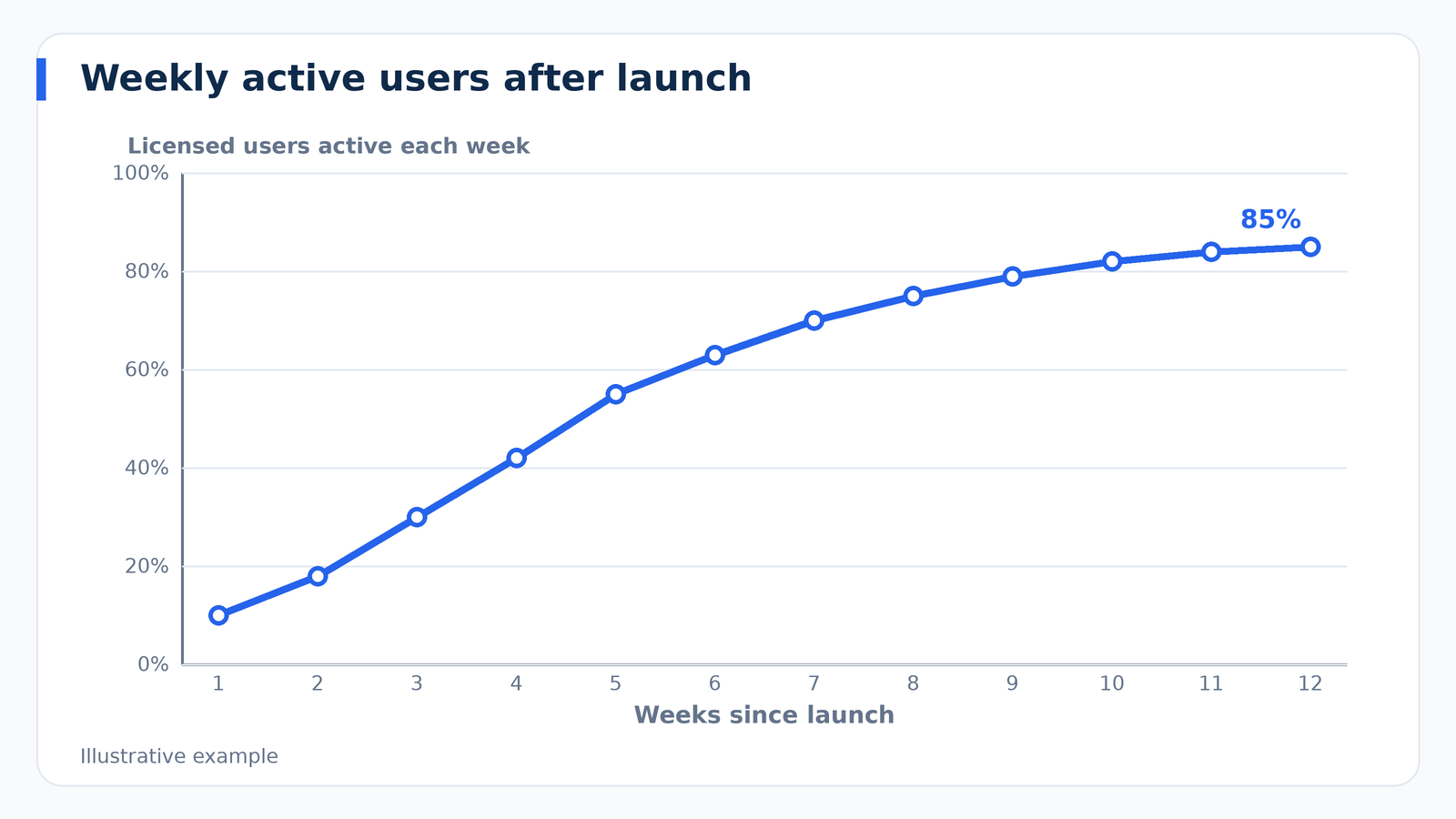
After launch, monitor both usage and outcomes. Adoption metrics include logins, records created, activities logged, and the percentage of deals with up-to-date stages. Outcome metrics return to the baselines you set in Step 1: response time, conversion rates, sales cycle length, forecast accuracy, and retention. Review them monthly. If adoption is low, find out why. The reason is usually something fixable, such as an awkward process, a missing integration, or insufficient training.
Step 12: Optimize Continuously
A CRM is never finished. Schedule a quarterly review to evaluate which fields nobody uses, which automations should be added, which reports leaders actually read, and what users find frustrating. Remove clutter as readily as you add features. Keep data healthy with periodic duplicate checks and validation rules. As your business evolves, update stages and fields so the system keeps matching reality.
A Sample 90-Day Implementation Plan
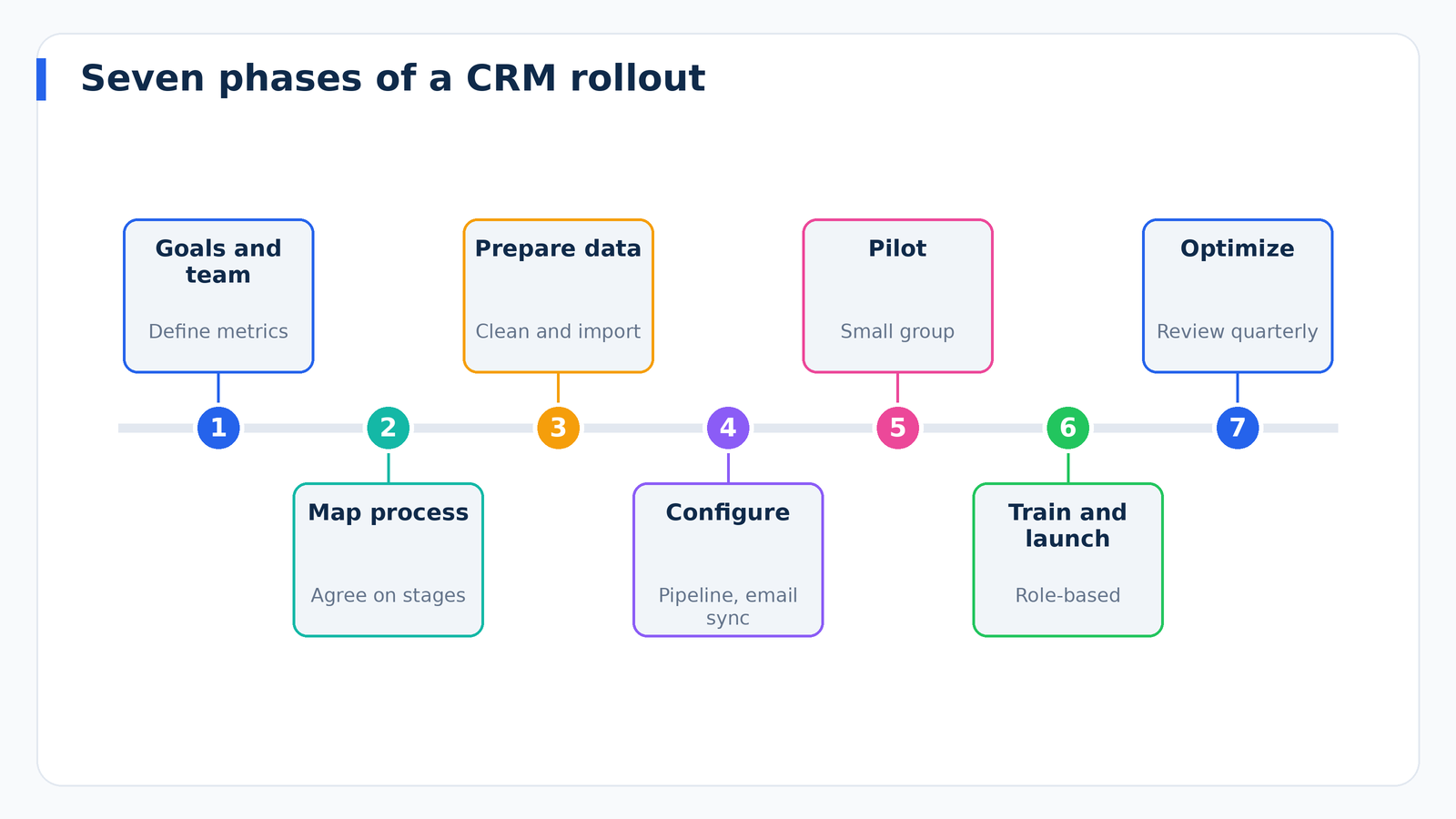
Days 1 to 14: Plan. Define goals, assemble the team, map processes, and record baselines.
Days 15 to 35: Prepare and configure. Design the data model, clean and map data, and configure pipelines, users, and email sync.
Days 36 to 55: Integrate and pilot. Connect key tools, import a sample, and run a pilot with champions.
Days 56 to 70: Train and launch. Refine based on feedback, complete full data import, train all users, and go live.
Days 71 to 90: Stabilize and review. Provide intensive support, monitor adoption, fix issues, and hold a formal review against your goals.
Small companies can compress this timeline, and complex organizations may extend it. The sequence matters more than the exact dates.
Data Security and Compliance Considerations
A CRM stores personal information, so protection is part of implementation. Use role-based access, enable multi-factor authentication, and review who can export data. Understand the privacy rules that apply to your audience and location, such as state privacy laws in the United States, and make sure your process for consent, opt-outs, and deletion requests can be handled in the system. If you work in a regulated industry, confirm that the vendor supports your requirements, and consult a qualified professional for legal questions.
Frequently Asked Questions
How long does a CRM implementation take?
A straightforward small-business rollout can take a couple of weeks, while complex projects with customization and integrations can take several months. Scope is the biggest factor.
Should we hire an implementation partner?
If your needs are simple and the platform is user-friendly, you can often handle it internally. For complex configurations, heavy integrations, or tight timelines, a partner can save time and prevent mistakes.
What is the best way to get salespeople to use the CRM?
Show them what is in it for them: less admin, better prioritization, and an easier path to commissions. Automate data entry where possible, keep the interface simple, and have managers run meetings from the CRM.
Is it better to launch everything at once or in phases?
Phases are usually safer. Start with core functionality, gather feedback, and expand. This approach reduces overwhelm and gives you room to adjust.
Final Thoughts
A successful CRM implementation is less about technology and more about clarity, discipline, and people. Define measurable goals, map and simplify your process, clean your data, configure only what you need, train in a practical way, and keep improving after launch. If you treat the rollout as a change-management project rather than a software installation, you dramatically increase the odds that your CRM becomes the trusted center of your customer relationships.