If you research CRM software for more than a few minutes, three names keep appearing: HubSpot, Salesforce, and Zoho. They are among the most widely used platforms in the world, each with a loyal following and a distinct philosophy. Choosing between them is less about finding a universal winner and more about matching a platform’s strengths to your team’s size, budget, technical resources, and growth plans.
This comparison explains how the three differ in approach, ease of use, customization, pricing structure, integrations, and ideal customers. Features, plan names, and prices change frequently, so treat this as a framework for evaluation and confirm current details on each vendor’s website and in a hands-on trial before you decide.
A Quick Overview
HubSpot began as an inbound marketing company and built its CRM around ease of use and a unified platform. Its core idea is that marketing, sales, service, and content management should share one customer database and a consistent interface. It is widely known for a friendly learning curve and a free CRM tier that lets small teams get started.
Salesforce is the long-standing market leader, especially in mid-market and enterprise organizations. Its strength is depth: an enormous ecosystem, extensive customization, and the ability to model complex processes. The trade-off is complexity, which often calls for dedicated administrators or implementation partners.
Zoho CRM is part of a large suite of business applications from Zoho Corporation. It is often chosen for strong value, wide functionality at accessible price points, and tight integration with other Zoho products covering finance, support, HR, and more. It offers considerable flexibility without the cost profile of the largest enterprise platforms.
Ease of Use and Learning Curve
For many buyers, usability decides the outcome, because a CRM nobody enjoys using ends up empty.
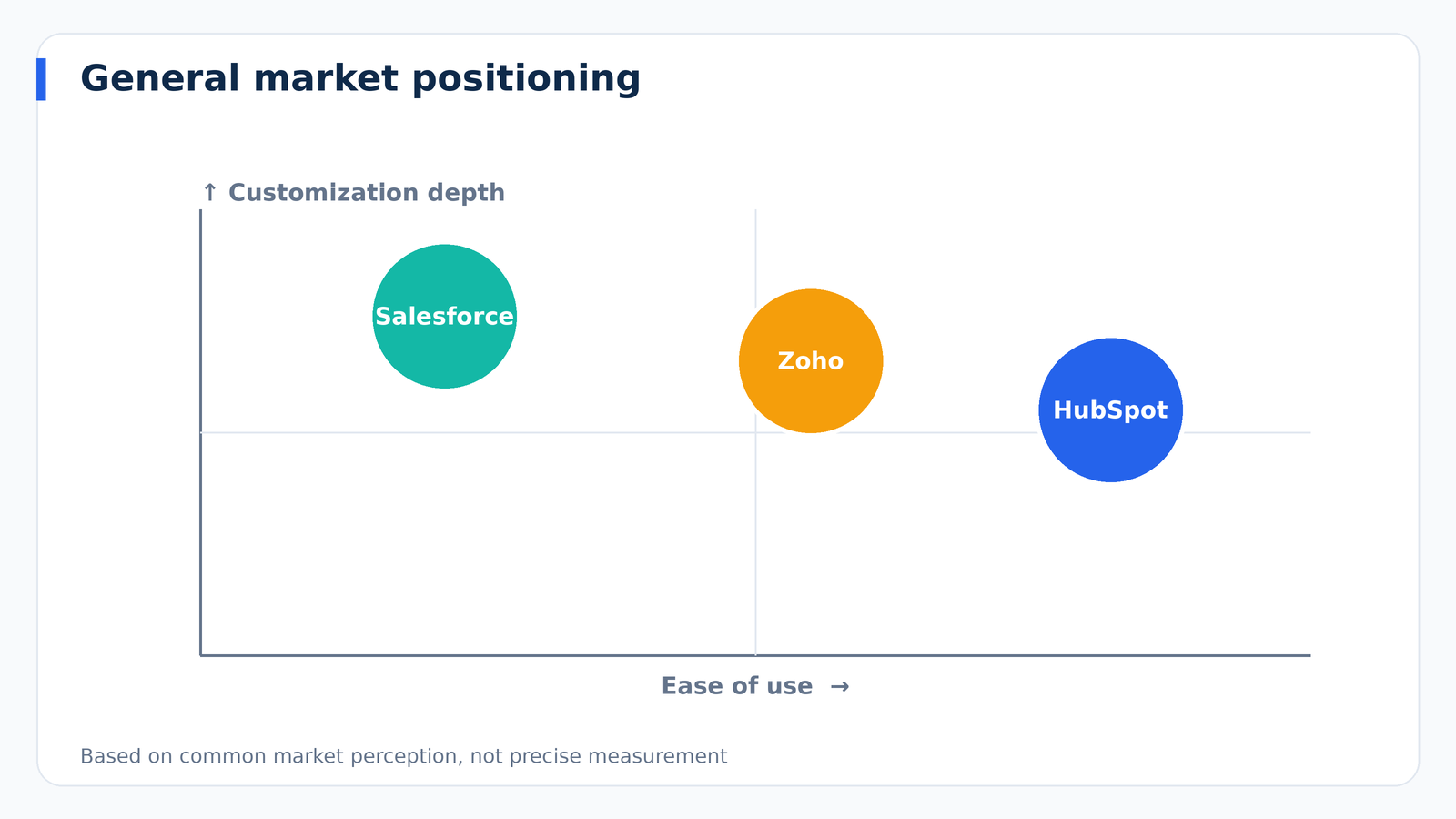
HubSpot is generally praised for a clean, intuitive interface. New users can often create contacts, build a pipeline, and log activities with little training. Its guided setup and extensive learning resources help non-technical teams become productive quickly.
Salesforce offers a powerful but more complex interface. Out of the box it can feel dense, and configuring it well takes expertise. Organizations that invest in setup and training gain a system tailored to their processes, but those without technical support may struggle.
Zoho CRM sits between the two. Its interface is functional and feature-rich, and while some find the number of options overwhelming at first, most small and mid-sized teams adapt comfortably. Zoho’s flexibility sometimes means more configuration decisions up front.
Customization and Flexibility
As your processes grow more specific, the ability to adapt the system becomes critical.
Salesforce leads here. It supports custom objects, advanced workflows, complex permission structures, and a developer platform for building applications on top of the CRM. Businesses with unusual processes, multiple business units, or detailed compliance needs often find that Salesforce can model them where simpler tools cannot.
HubSpot offers good customization within a more structured framework. You can create custom properties, objects on certain plans, workflows, and reports, but the platform intentionally guides users toward its way of working. This keeps things simple while still covering the needs of most growing businesses.
Zoho CRM provides substantial customization, including custom modules, fields, layouts, and workflow automation, plus its own scripting capabilities. It often delivers a high degree of flexibility at a lower cost than the largest platforms.
Marketing, Sales, and Service Capabilities
CRM platforms are increasingly sold as suites. Consider how much you want in one place.
HubSpot organizes its offering into hubs for marketing, sales, service, content, and operations, all sharing one database. Marketing automation, landing pages, email, forms, and reporting are central strengths, which appeals to teams that want marketing and sales tightly aligned.
Salesforce offers separate clouds for sales, service, marketing, commerce, and more, along with analytics and industry-specific solutions. The breadth is vast, and organizations often combine several products, though doing so adds cost and complexity.
Zoho provides CRM along with a broad catalog of related applications, such as campaigns, desk, books, and a bundled suite option. If you want a single vendor for many business functions at a reasonable price, this is an appealing path.
Pricing Approach
Exact prices change often, so focus on structure rather than numbers.
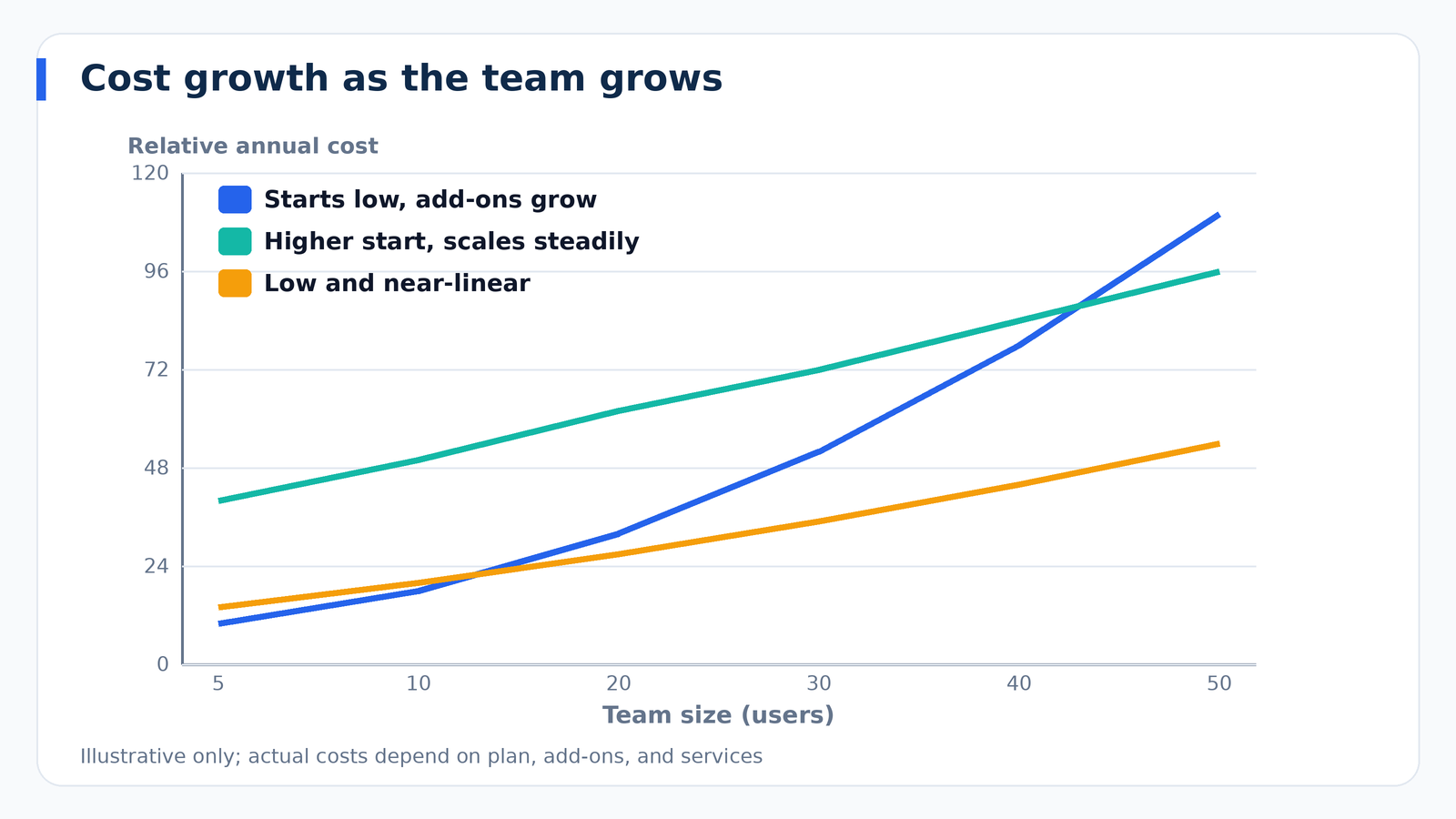
HubSpot offers a free CRM tier and paid plans organized by hub and by tier, typically starter, professional, and enterprise. Costs are friendly at the beginning but can rise significantly as you add hubs, contacts, and advanced features. Some capabilities, such as sophisticated automation, sit on higher tiers, so model your expected needs before assuming the entry price will cover you.
Salesforce uses per-user pricing across editions, with add-ons and separate products priced individually. The base subscription is only part of the cost. Implementation, customization, administration, and integrations frequently add substantially to the total, which is why organizations should calculate total cost of ownership rather than comparing license fees alone.
Zoho CRM is typically positioned as the value option, with per-user pricing across several editions and, in the past, a free tier for small teams. Its suite bundles can lower the cost of running multiple applications. As always, check the current plan limits and what each tier includes.
Integrations and Ecosystem
Salesforce has one of the largest app marketplaces in the industry and a deep network of consultants and developers. If you need a specialized integration, there is a good chance someone has built it.
HubSpot offers a substantial app marketplace and native connections to many popular tools, and its open API allows custom integrations. Its approach emphasizes making integrations straightforward for non-developers.
Zoho integrates smoothly with its own applications and offers connections to many third-party tools, along with an integration platform for custom workflows. It also works with common connectors such as Zapier.
Whichever platform you choose, list your must-have integrations first and verify that each one is available and what it costs.
Reporting and Analytics
All three provide dashboards and reports, but their depth differs. Salesforce offers highly configurable reporting and advanced analytics options, suited to organizations with data teams. HubSpot excels at making marketing attribution and sales reporting accessible to non-analysts, particularly when marketing and sales use the same platform. Zoho offers a capable range of reports and dashboards, with additional analytics available through its related tools. If forecasting and executive reporting are priorities, test each platform with a realistic scenario.
Automation and AI Features
Each vendor has invested heavily in automation and artificial intelligence, including lead scoring, predictive insights, content drafting, and conversation summaries. Capabilities and plan availability evolve rapidly, so evaluate current offerings rather than relying on old comparisons. A practical test is to ask which AI features are included at your price level, what data they use, and how they handle privacy and security.
Support and Community
Quality of support and community resources affects the day-to-day experience. HubSpot is known for extensive free education and a helpful community. Salesforce has a vast training ecosystem and large user community, along with certified professionals for hire. Zoho provides documentation, community forums, and support options that vary by plan. Check support hours, response expectations, and whether premium support carries an extra charge.
Who Each Platform Fits Best
Choose HubSpot If…
- You want a user-friendly system your team can adopt quickly.
- Marketing and sales alignment is a priority.
- You have limited technical resources.
- You prefer starting free or small and expanding as you grow.
Choose Salesforce If…
- You have complex processes, multiple teams, or regulatory needs.
- You need deep customization and a large ecosystem.
- You have budget and staff for administration and implementation.
- You expect to scale into a large organization.
Choose Zoho If…
- Value for money is a major factor.
- You want broad functionality and flexibility without enterprise pricing.
- You plan to use other Zoho applications for finance, support, or operations.
- You are comfortable investing time to configure the system.
Potential Drawbacks to Consider
HubSpot: Costs can climb as you add contacts, hubs, and premium features, and highly unusual processes may push the limits of its structure.
Salesforce: Complexity and total cost can be significant, and adoption can suffer without good training and administration.
Zoho: The abundance of features and settings can feel overwhelming, and user experience varies across the broader suite of products.
How to Make Your Decision
- Define requirements. List must-have features, integrations, and process needs.
- Estimate your three-year cost. Include licenses, add-ons, implementation, and staff time.
- Shortlist and trial. Test two platforms with your real data and workflows.
- Involve users. Ask the people who will use it daily to complete actual tasks and score the experience.
- Check references. Talk to companies similar to yours about their experience.
- Review exit options. Confirm how you can export data if you ever switch.
Other Platforms Worth a Look
These three are not the only strong options. Depending on your needs, you may also evaluate platforms such as Pipedrive for visual sales pipelines, Microsoft Dynamics 365 for organizations invested in the Microsoft ecosystem, Freshsales for straightforward sales teams, Monday.com or Copper for teams who live in work management or Google Workspace, and industry-specific CRMs for fields like real estate or financial services. A short, honest evaluation of two or three finalists is better than endlessly comparing a dozen.
Frequently Asked Questions
Which is the easiest CRM to use?
HubSpot is commonly regarded as the easiest to learn, particularly for small teams, though ease of use is subjective. Try each product with your own workflow.
Which CRM is best for small businesses?
Many small businesses start with HubSpot or Zoho because of accessible entry plans and simple setup. The right choice depends on your needs and budget.
Is Salesforce too complicated for small companies?
It can be, unless you have the resources to configure it well. Some small companies with demanding processes or ambitious growth plans still choose it, often with the help of a consultant.
Can I switch later?
Yes, though migrations take planning. Keep clean data, document your customizations, and make sure the system you pick supports data export.
Final Thoughts
HubSpot, Salesforce, and Zoho each earn their popularity. HubSpot wins on simplicity and marketing alignment, Salesforce on depth and scale, and Zoho on value and breadth. The best choice is the one that matches your team’s skills, budget, and growth path, and that people will actually use. Define your requirements, test with real workflows, calculate the full cost, and choose confidently. A thoughtful decision now will save you from an expensive migration later.